CREATING YOUR OWN WEB SITE
| Creating a Web Page | Viewing your Web Page | Creating a Web Site | Uploading your Web Site |
A Web Site is made up of Web Pages that are created using a language called HyperText Markup Language (HTML). HTML consists of tags which tell the Browser how the Web Page should be displayed. For example the <B> tag tells the Browser that the text should be displayed in bold until the Browser comes across the closing bold tag </B>.
In a line of text <B>this would be displayed in bold</B>
If you know the tags you can create Web Pages in any text editor, such as Notepad, as long as the file is saved with an htm extension, ie 'myfile.htm'. This enables the Browser to load and display the file.
The task of creating Web Pages can be made much easier by using a Web Page Editor. There are many good Web Page Editors that can be downloaded for free form the Web.
Have a look at Joe Barta's excellent on-line guide, and learn how to use HTML to create your own Web Pages.
When your Web Page has been create and saved with an .htm extension, you can view it by loading it into your Browser. Click on File, Open to load the Web Page into the Browser.
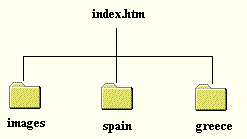
A Web Site usually consists of several Web Pages and their associated images. The Site should be created on your computer hard drive using a logical structure of folders. The front page should be called index.htm. An example of the structure of a Web Site about two holidays, might look like this, a seperate folder stores the images used in all the pages.
Your Web Site will need to be uploaded from your hard drive to the computer
on the Web which is to act as the host. Firstly you will need to decide where
your Web Site is to be hosted:
-
Your Internet Service Provider may give you free space to store your Web Site. Chech out your Internet Service Providers home page.
-
If you don't have access to free Web Space then you can create yourself an account and then upload and store your Web Site to either Geocities or Tripod
To upload your Web Site you will need to use a File Transfer Program (FTP). This is a program that enables you to connect to the host computer and transfer the files from your hard drive onto the host.
Free FTP software can be downloaded from: